 Loading... Please wait...
- My Account
- Order Status
- Buy Voucher - Buy Voucher
- View Cart

- Home
- Support
- About Us
- Terms and Conditions Of Use
-
Article
- Essential Spare Parts for Maintaining Industrial Printers
- Everything You Need to Know About Custom Banner Printing
- How to clean a clogged print head
- How to Make a Statement with a Custom Banner
- Ricoh G6 Printhead: You Need to Know
- Toshiba CF3R Printhead: A Next-Level Industrial Recirculation Printhead
- 500 ChatGPT Prompts 2024-Unlocking Creativity and Productivity
- Setting cutting width / Setting Page Length Graphtec Printer
- Aligning the Print Head Canon
- Setting Up Your Roland Printer on Your Network
- Comprehensive guide to epson printer troubleshooting and service
- What is a printed circuit board?
- Shipping & Returns
- Contact Us
Categories
Our Newsletter


Aligning the Print Head Canon
Automatic Print Head Alignment
If printed ruled lines are misaligned or print results are otherwise unsatisfactory, adjust the print head position.
You need to prepare: a sheet of A4 or Letter-sized plain paper
REFERENCE
- If the remaining ink level is low, the print head alignment sheet will not be printed correctly.
Replace the ink tank whose ink is low.
-> [ Replacing an Ink Tank ]
- The print head alignment pattern is printed in black and blue.
Aligning the Print Head without a computer
- You can also align the Print Head from the printer itself using the RESUME/CANCEL button.
(1) Make sure that the power is turned on, and load a sheet of A4 or Letter-sized plain paper.
(2) Open the Front Cover gently, and pull out the Paper Output Tray.
(3) Hold down the RESUME/CANCEL button until the POWER lamp flashes blue four times, then release it immediately.
The print head alignment sheet will be printed and the printer will adjust the print head position automatically.
Do not perform any other operations until the printer completes the printing of the print head alignment pattern.
=> WINDOWS :
1. Make sure that the power is turned on.
2. Load a sheet of A4 or Letter-sized plain paper.
3. Open the Front Cover gently, and pull out the Paper Output Tray.
4. Open the printer driver setup window.
5. Adjust the print head position.
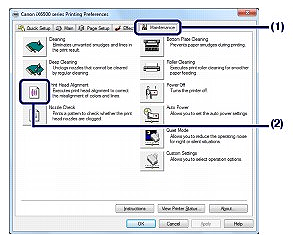
(1) Click the Maintenance tab.
(2) Click Print Head Alignment.
2. Load a sheet of A4 or Letter-sized plain paper.
3. Open the Front Cover gently, and pull out the Paper Output Tray.
4. Open the printer driver setup window.
5. Adjust the print head position.
(1) Click the Maintenance tab.
(2) Click Print Head Alignment.
(3) Confirm the message and click Align Print Head.
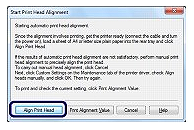
The print head alignment sheet will be printed and the print head position will be adjusted automatically.
Do not perform any other operations until the printer completes the printing of the print head alignment pattern. This takes about 3 minutes.


